Salary, location and commute
Before anything is scored, every role is measured against your own criteria in a fixed order: is it in the UK, does its salary clear your floor, is the commute inside your maximum. The first clear failure ends it there.
UK only
Rolehound searches UK vacancies, and a role it can tell is outside the UK is dropped. There is no setting for this one; it always applies.
A location it cannot classify — an unfamiliar town name, a place written in a way it does not recognise — is kept and flagged for review instead.
Salary floor
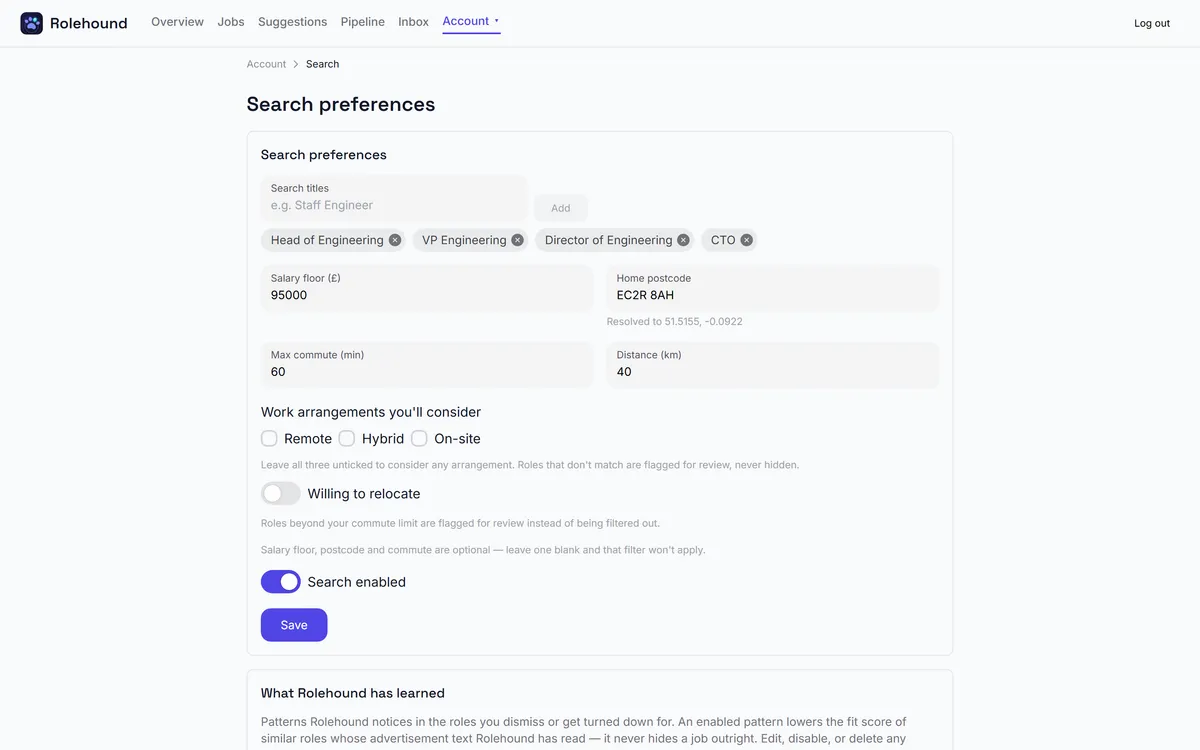
Salary floor (£) on the Search tab. Leave it blank and the check does not apply.
Set it, and a role whose advertised salary falls below it is dropped. The comparison uses the top of the advertised range, so a role posted at £50,000–£70,000 clears a floor of £65,000.
A role with no salary stated is never dropped for it — it is flagged instead. Plenty of good listings state none, and most careers-board postings do.
Commute
Two fields working together: Home postcode and Max commute (min). Leave either blank and the check does not apply. A postcode that resolves shows its coordinates underneath the field, which is how you know it was understood.
Remote and hybrid roles skip the check entirely. For an on-site role the estimate is a driving time from your postcode, not a distance on a map — so a long motorway run can beat a much shorter cross-city one. Where the location is unusable, or the estimate cannot be worked out, the role is flagged rather than dropped.
Distance (km) is not one of these
Distance (km) sits on the same card but does something different. It is not applied to results — it is passed to the job board as a parameter when the keyword searches run, so widening it changes what comes back rather than un-dropping anything.
A dropped role is gone, not hidden
A role that fails one of these checks is never stored as a job. There is no filter to switch off and no list to reveal. One exception: a role from a job-alert email is recorded against that email, and the Inbox page shows it under Rejected by gates with the check it failed.
What you can see are the ones that were flagged. Those arrive on your list and say why: open Not suitable on the entry and the check that could not be completed is named.
If a check is too tight
Change it on Search and it applies from the next run. Nothing is reconsidered retrospectively, so a posting dropped last week reappears only if it is still live when a later search finds it again.
If you know of one particular role, paste its URL on the Jobs page. A job you added yourself is never dropped by these checks — it is flagged, so you can read the objection and decide for yourself.
Where these are set
Salary floor, home postcode and maximum commute are all on the Search page.