Every part of the job search, in one place.
Finding roles, working out which are worth your time, and getting an application out and tracked — Rolehound does all three, and shows its working at each step.
A job search is really three jobs: finding roles, deciding which ones deserve an evening of your time, and getting an application written, sent and tracked. Rolehound takes on all three, and the sections below set out exactly what it does at each stage — and what it deliberately leaves to you.
Finding roles
Keyword search across job boards
Your search titles are run against a job-board aggregator covering UK vacancies, using your salary floor and search distance as query parameters. The search repeats in the background, so new postings arrive without you going looking for them.
Job-alert emails
Alert emails that reach your connected mailbox are recognised as alerts, read for the roles inside them, and filed away. Forward the alerts you already get to that mailbox and every board you have ever subscribed to feeds the same scored list.
Jobs you paste in
Paste one job URL or a whole list of them. Rolehound fetches each page, pulls the role out of it, and adds it alongside everything else. A job you chose yourself is never dropped by the filters — if it fails one, it is flagged so you can see why and decide for yourself.
Company watchlist
Follow employers from the watchlist and Rolehound reads their own careers boards — Greenhouse, Lever, Ashby, Workable, Workday and BambooHR — for openings that match your search titles. That catches roles that never make it onto a job board at all.
Deciding what's worth your time
Location, salary and commute filters
Roles outside the UK are dropped, as are roles whose stated salary falls below your floor or whose commute from your home postcode exceeds the maximum you set. Remote and hybrid roles skip the commute check. Anything the filters cannot judge is flagged for review instead of discarded, because losing a good role is worse than seeing a doubtful one.
Fit scoring against your CV
Each surviving role is read against your profile — your titles, skills, sectors, must-haves and dealbreakers — and comes back with a score, a one-line summary, the strengths and the concerns. Sort by score and the shortlist writes itself.
Duplicate detection
The same role posted to four boards is one role. Rolehound collapses identical postings as they arrive, whichever source they came from. The near-misses — same employer, same job title, different locality or source — are left alone and marked instead: the job card carries a notice that opens to list the other copies, so you can dismiss whichever you do not want, one at a time, or say they are not duplicates and stop the notice appearing.
Your settings, your search
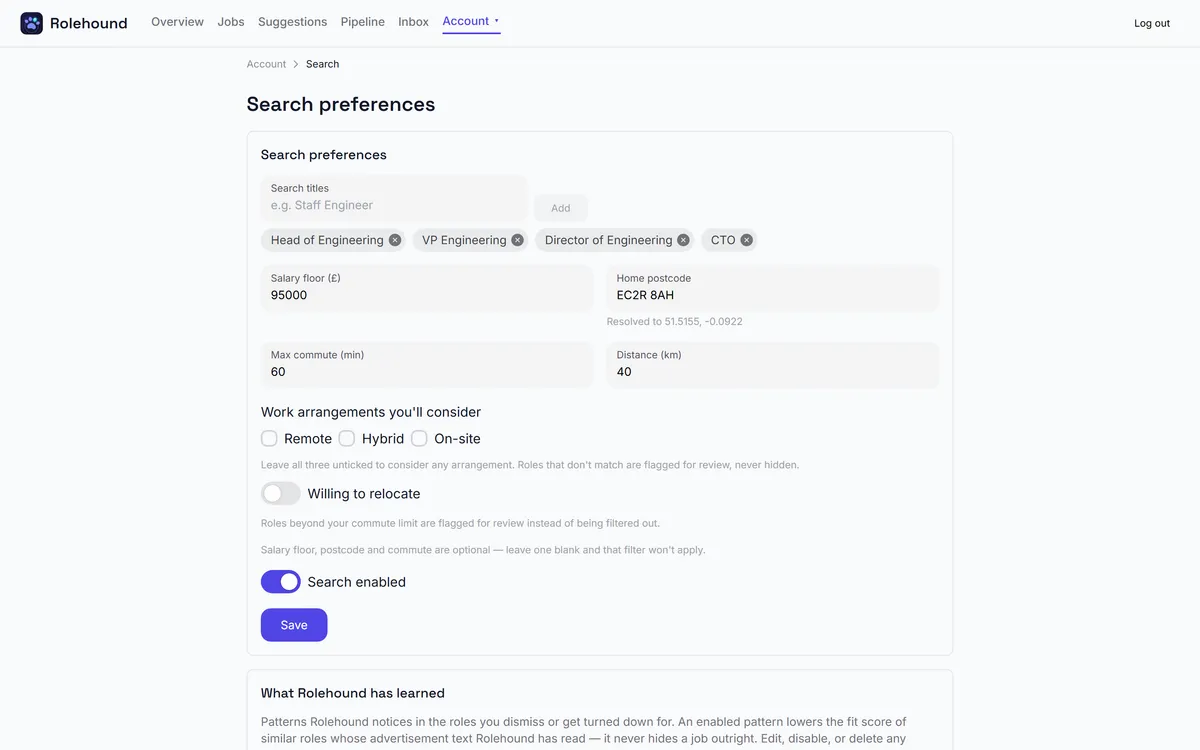
Salary floor, home postcode, maximum commute and the titles you are searching for are set on your own Search tab. They are yours alone, not a global configuration. Connect your mailbox separately, with an app password or by signing in with Google or Microsoft.
Applying and tracking
Tailored CV and cover letter
For a role you have picked, Rolehound rewrites your CV around that job and writes a cover letter to match. What it finds out about the employer feeds the cover letter only — it is not allowed to alter a fact on your CV. Both come out as PDFs you download and send yourself.
A pipeline board
Every application sits on a board that runs from Draft and Applied through Acknowledged, Responded, Interview and Offer, with closed lanes for Rejected, Withdrawn and Removed. Drag a card to move it; only the moves that make sense from its current stage are offered.
Replies move your cards
With a mailbox connected, Rolehound reads incoming mail, works out which application it belongs to, and advances that card on the evidence — an acknowledgement, a reply, an interview invitation, an offer. It only ever moves forward, and a rejection is flagged for you to confirm rather than applied behind your back.
An audit trail
The Audit page lists the work done on your account, by area — ingestion, scoring, profile, applications and email. What was ingested, what was scored, what was drafted, which cards moved and on what evidence. It records what happened to your data rather than your comings and goings, so nothing is done with your data that you cannot go back and check.
A board that keeps itself current
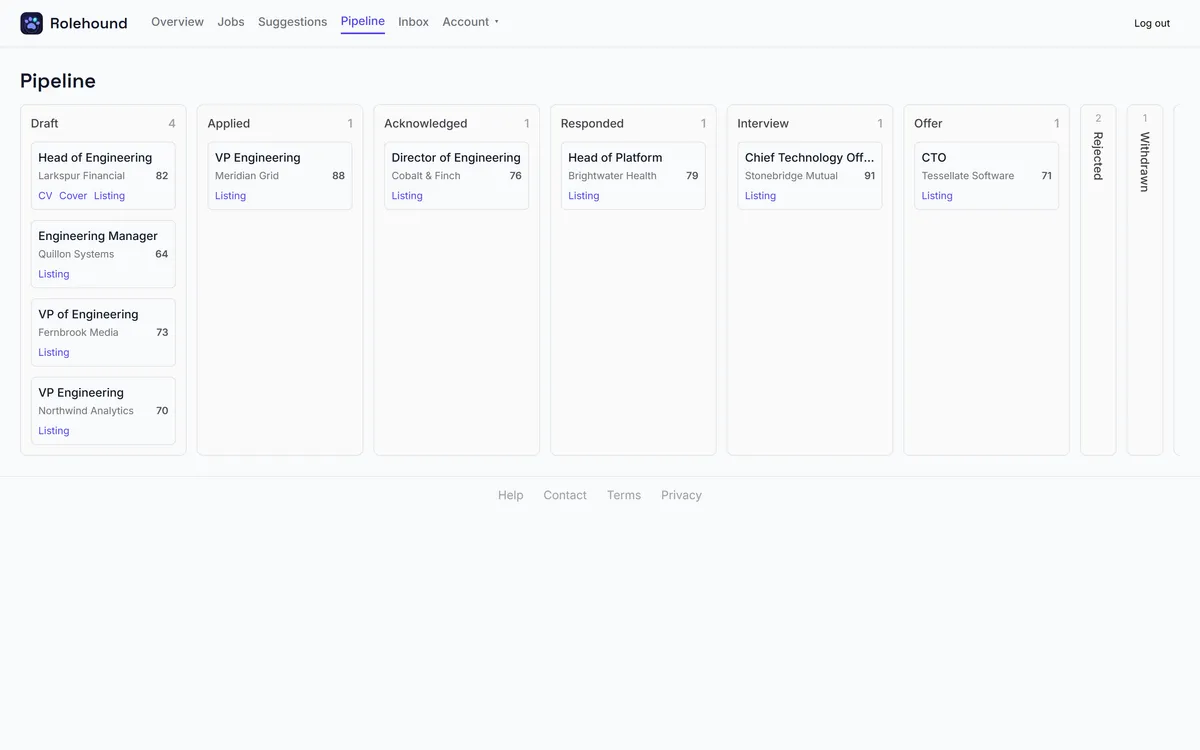
Every application sits on a pipeline board. As replies land in your connected mailbox, Rolehound reads them, works out what they mean and moves the card — forward only, never backwards, and never without leaving an audit entry.
Forward only. Anything uncertain waits for you to confirm it.
About the AI
Where exactly is AI used?
In four places. Extraction pulls structured detail out of text you supply — your CV, job-alert emails, the job pages behind URLs you paste in. Scoring rates a role against your profile. Classification works out what an incoming email means for an application. Drafting writes your tailored CV and cover letter, and researches the employer for the letter. The first three run on a fast, inexpensive model; drafting runs on the strongest model available, because it is the one an employer reads.
Can I bring my own provider key?
Yes. Add an Anthropic, OpenAI or Google key on the Billing page and choose the matching provider, and every call above runs on your key. Usage on your own key is not metered or charged by Rolehound — your provider bills you directly. Without a key of your own, calls run on Rolehound's Anthropic key and are metered against your credit.
Is my data used to train models?
Rolehound does not train any model on your CV, your mail or your applications, and does not use one account's data to improve anything for another. The text needed to answer a call is sent to whichever AI provider is handling it, and what that provider does with it is governed by the terms of the key in use — your own, if you have connected one.
See it against your own CV
Create an account, import your CV, and Rolehound starts bringing you scored roles.
Create your account