It tracks down the roles. You take your pick.
Rolehound is a UK job-search assistant that finds roles, scores them against your CV, drafts a tailored CV and cover letter for the ones you pick, and tracks replies from your inbox.
Everything you need to land the right role
Jobs found for you
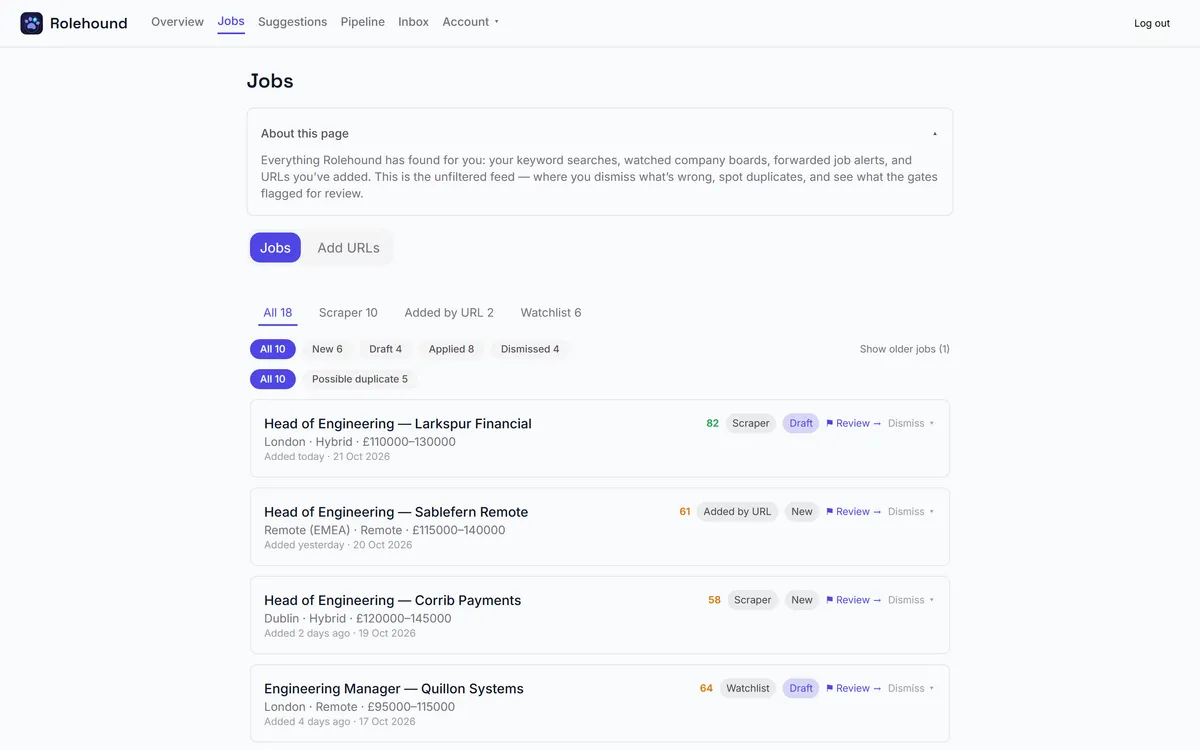
Roles arrive from four places: keyword searches run against UK job boards, job-alert emails that reach your connected mailbox, job URLs you paste in, and a watchlist of employers whose own careers boards Rolehound checks for you.
Filtered before you see them
Every role is measured against the criteria you set: UK location, your salary floor, and the commute time from your home postcode. Roles that fail are dropped. Roles that cannot be judged — no salary stated, a location that will not resolve — are flagged for you rather than binned.
Scored against your CV
Rolehound reads each role against your profile and returns a fit score with a short summary, the strengths it found and the concerns it has. The best matches sort to the top, so your evening goes on a shortlist rather than a whole job board.
Applications drafted for you
For any role you choose, Rolehound writes a CV rewritten around that job and a cover letter to match, then renders both as PDFs you can download and send.
Every role, scored before you open it
Roles arrive already measured against your CV, with a fit score, a short summary and the concerns Rolehound has about the match. The best matches sort to the top, so an evening goes on a shortlist rather than a job board.
How it works
- Add your CV and say what you are looking for. Importing your CV builds your profile and seeds your search titles. You set your salary floor, home postcode and maximum commute on the Search tab.
- Rolehound searches and scores in the background. New roles are de-duplicated, filtered against your criteria and scored against your profile before you ever look at them.
- Review, generate, apply. Work down the scored list, generate a tailored CV and cover letter for the roles you want, send them yourself, and watch each application move across your pipeline board as replies come in.
There is a fuller walkthrough on the how it works page, along with what Rolehound does, what it costs and how your data is handled.
Common questions
Do I need to give Rolehound my email password?
No. Connect Gmail or Outlook with OAuth and Rolehound never sees a password at all. If you would rather not use OAuth, or your mail is somewhere else, use an app password instead. Either way the connection is read-and-file only: Rolehound reads every message arriving in that inbox and files each one it has classified into a Rolehound folder — including mail it judged irrelevant, which is why a mailbox kept for your job search is the better one to connect. It never sends anything from your account, and never deletes or trashes a message. The security page has the full detail.
Will it apply to jobs on my behalf?
No. Rolehound drafts; you send. It writes the CV and the cover letter and hands them to you as PDFs, and the decision to apply — and the act of applying — stays with you.
What does it cost?
Every account starts with a 14-day free trial and no card is needed. After that it is £5 per month for the platform, plus prepaid credit for the AI work, or you can connect your own provider key and your provider bills that usage instead, with nothing metered by Rolehound. The current figures are on the pricing page, linked above.
Can I use my own AI provider key?
Yes. Add an Anthropic, OpenAI or Google key on the Billing page and pick the matching provider. Every call then runs on your key — extraction, scoring, classification and drafting alike — and Rolehound does not meter or charge for it.
Is my data private?
Your account only ever shows your own data. Every record carries your user id and is filtered at the database level, so your CV, your mail and your applications are not visible to other users. The security page, linked above, sets out how each of those is stored.
Start with your CV
Create an account, import your CV, and let Rolehound bring you the roles worth reading.
Create your account