Connecting with an app password
Any IMAP mailbox can be connected with a host, a port, a username and an app password. This is the route to use if your mail is not with Google or Microsoft, or if OAuth is not available on this instance.
Get an app password from your provider first
An app password is a separate credential your mail provider issues for one program. Use one rather than your real password, for three reasons. It can be withdrawn on its own without changing anything else. It does not sign anyone in to the rest of your account. And most providers with two-step verification turned on will refuse a real password over IMAP anyway.
Where it is generated differs by provider, so look for app passwords in your mail account's security settings. Copy it when it appears — most providers show it once and never again.
Filling in the form
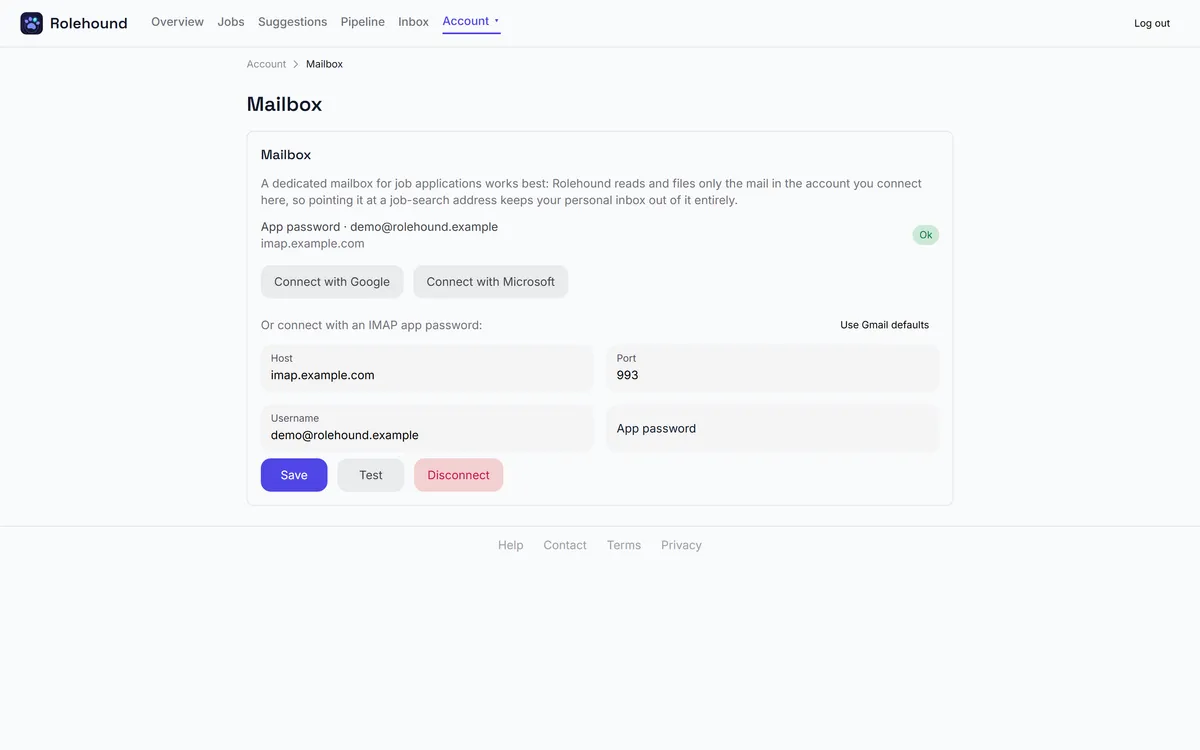
On Mailbox, under Or connect with an IMAP app password:
- Host — your provider's IMAP server, in the shape of imap.example.com.
- Port — 993 unless your provider says otherwise.
- Username — usually your full email address.
- App password — the credential you just generated.
Use Gmail defaults fills the host and port in for you. Press Save and the connection is tested straight away: the card shows Ok, or an error saying it could not connect with those credentials. Test re-runs that check whenever you want it.
The connection is made over TLS. Whether saving one needs an active subscription depends on how your instance is configured; on the configuration Rolehound ships with, it does not.
What is stored
The host, the port and the username as you typed them, and the app password encrypted before it is written. It is never shown back to you, never returned by the API and never written to a log. Be clear about what that encryption is worth, though — the security page says plainly what it does and does not put the secret out of reach of. Read it before you decide.
Revoking
Two separate things, and doing both is the thorough answer.
Disconnect on the Mailbox card removes the stored connection and its secret from Rolehound. Deleting the app password in your mail provider's own settings makes it useless everywhere, whatever still holds a copy.
If you have any doubt at all, do the second one first. It is the one that does not depend on Rolehound behaving.
Where the IMAP fields live
The host, port, username and app password sit together on the Mailbox tab, under the two OAuth buttons. Save stores the connection; Test checks it without waiting for the next scheduled poll.