Reviewing and downloading your documents
Once a prepare finishes, two documents belong to the application: a CV and a cover letter, each held as text and as a finished PDF.
Where the links are
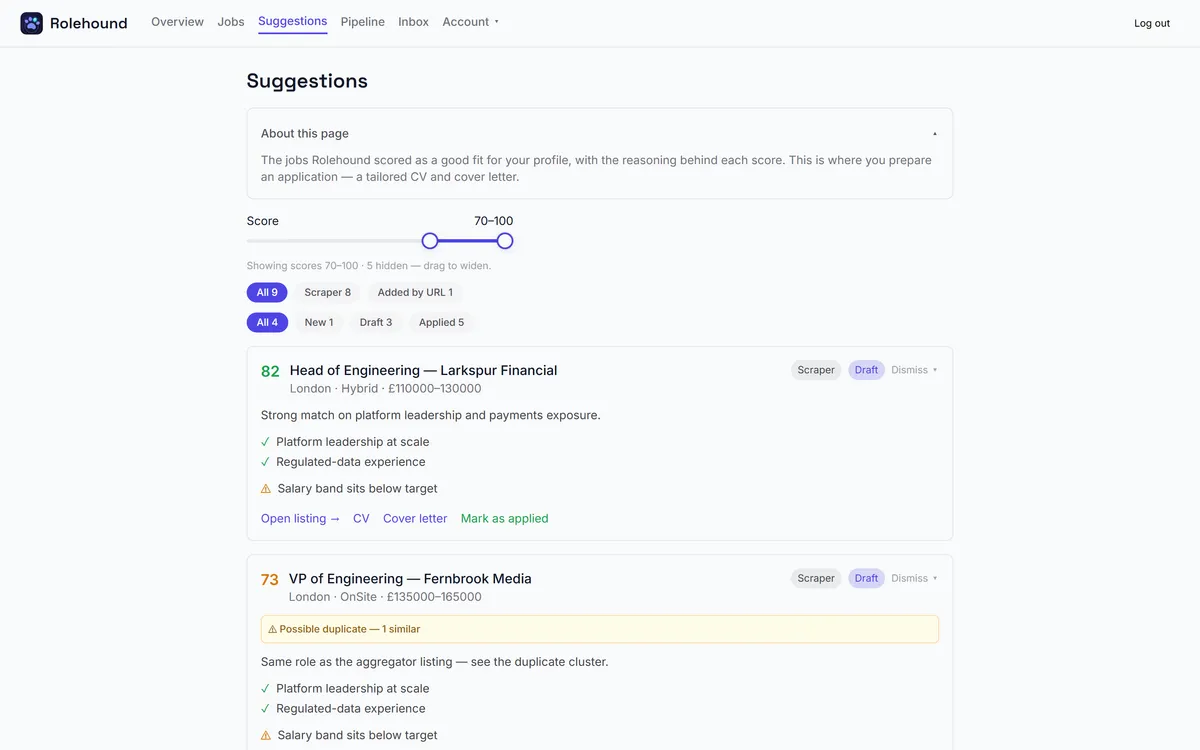
Three places, all pointing at the same two documents. On the Suggestions tab the row for that role gains CV and Cover letter. The card on the Pipeline board shows CV and Cover.
The Jobs page has them too, as View CV and View cover letter, but they are tucked away: they appear only on a job that was flagged by the gates or scored too low to suggest, and only once you open its Not suitable panel. A well-scoring job shows no document links on Jobs at all, so use Suggestions or the board.
A link opens the PDF in a new tab, where your browser will let you read it, print it or save it. The file is named for you, the document and the role — something along the lines of Jane Smith CV Senior Analyst.pdf — so a folder of applications stays readable without renaming anything.
While a prepare is running
The links disappear while documents are being generated, and come back when the new ones are ready.
That is deliberate. Until the new version is written, those links still address the previous one, and handing you last week's CV dressed as this week's is worse than making you wait.
Regenerating
Preparing the same role again runs the whole thing from scratch — fresh research, a fresh rewrite, fresh PDFs — and the new pair replaces the old. The previous documents are not kept. If you want a version you can go back to, save the PDF before you regenerate.
It is worth doing when something upstream has changed: a corrected profile, a re-imported CV, an edited summary. It is not worth doing in the hope of a better answer from the same inputs. A second draft is different, not better, and it costs the same as the first.
There is no editor
Rolehound has no screen for editing these documents. What you get is a finished PDF. If a line is wrong, there are two routes: fix the profile it came from and regenerate, or take the PDF away and work on it in your own tools.
Of the two, fixing the profile is the one that keeps paying — every future draft reads from it, so a correction made once stops the same mistake appearing in every application after it. See editing your profile.
Read them properly
These go out under your name, so read both end to end before you send anything. What the draft is and is not allowed to do is set out in generating a tailored CV and cover letter.
Where the links appear
A prepared application carries its CV and cover letter as links on the card itself, so the documents are one click from wherever you are reading the role.