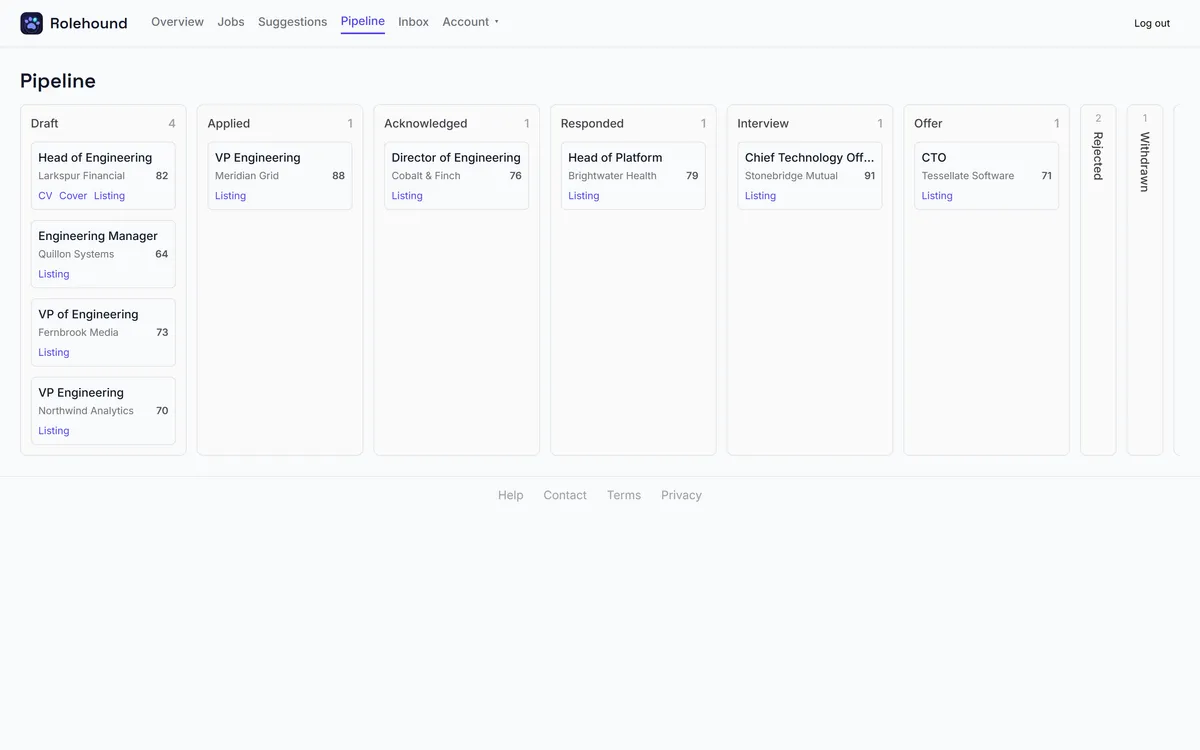
The pipeline board
Every application you prepare becomes a card on the Pipeline board. The board has nine lanes, in this order: Draft, Applied, Acknowledged, Responded, Interview, Offer, Rejected, Withdrawn and Removed. Those are the stages themselves — there are no others, and you cannot add one.
The six active stages
Draft — an application exists and its documents have been asked for. Nothing has been sent. Every new application starts here.
Applied — you have sent it. Rolehound does not submit applications, and no incoming reply ever parks a card here: you are the only thing that moves one into this lane. An employer's reply can carry a card straight past Applied to a later stage, but never into it.
Acknowledged — a received-your-application message came back. Usually automated, and it tells you only that the application arrived.
Responded — a real reply from a person, but not yet an invitation.
Interview — an invitation to talk.
Offer — an offer.
The three closed lanes
Rejected, Withdrawn and Removed close an application. Rejected and Withdrawn can each be archived on to Removed, and nothing leaves Removed — it is the end of the line. An application is also put into Removed for you when you dismiss its job as expired or no longer available.
On a wide screen those three collapse to narrow rails on the right, so the active stages get the width. Click a rail to expand it, and the board remembers which ones you left open. A card can still be dropped straight onto a collapsed rail.
Reading a card
Each card shows the job title, the employer and the fit score, with links to the CV, the cover letter and the original listing.
While documents are being generated the card reads Preparing… and the document links are hidden — until the new pair lands, those links still address the previous version. A card that says Waiting is queued behind something like an empty credit balance and will finish by itself; one that says Prepare failed gives the reason but carries no retry button — go to Suggestions or Jobs to ask again.
On a narrow screen
The nine columns become a row of stage chips with a count on each. Tap one to see the cards in that stage. It opens on the first stage that has anything in it.
The board also refreshes itself while you watch it, because your cards can move without you — see how a reply advances a card.
The board at a glance
Each lane holds the applications sitting at that stage. Closed lanes collapse to a narrow spine on the right so they stay out of the way without disappearing.